FlutterOn-device ML
Devoice
A pocket interpreter that translates live conversations on your phone, even offline, with no account required.
A pocket interpreter that translates live conversations on your phone, even offline, with no account required.
Most translation apps want a connection, an account, and a copy of your audio in the cloud. That is fine in a café with Wi-Fi. It falls apart on a plane, in a basement, or anywhere you would rather keep a conversation between the people who are actually in it.
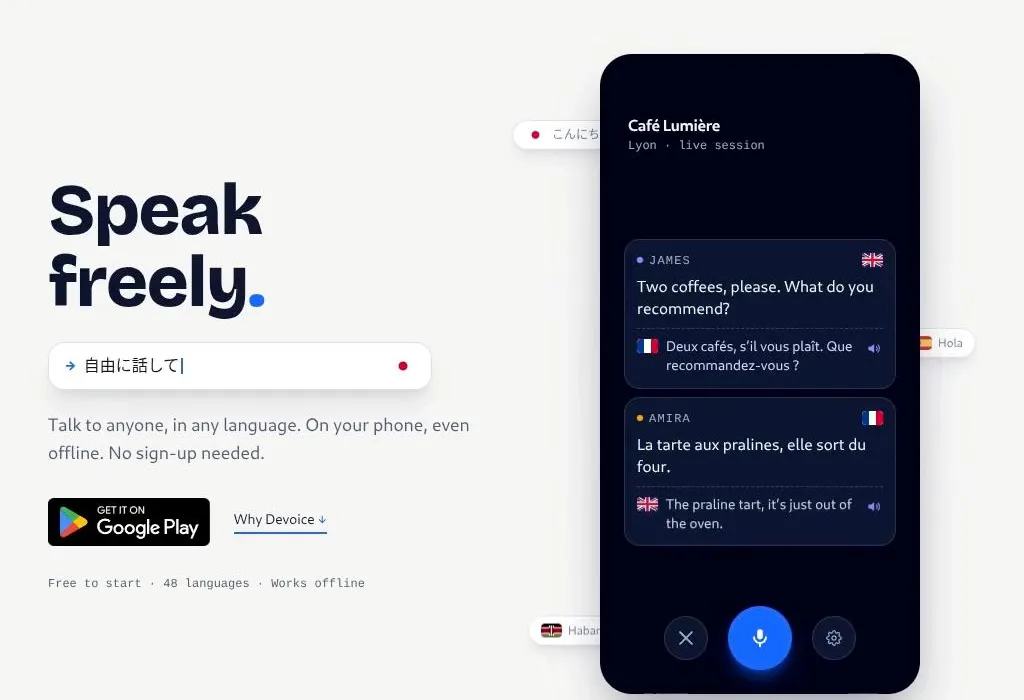
Devoice is the pivot away from that model. It is a pocket interpreter for Android: talk to someone in another language, on your phone, even offline, with no sign-up. Free to start, 48 languages, and your words stay on the device for every step that matters.
Cross-language conversation is still awkward in practice. You open an app, wait for a network round trip, hope the transcript is usable, then pass the phone back and forth. In a group, nobody can tell who said what. Offline, the app simply refuses to work.
I wanted something closer to an interpreter you can carry: hold the phone, speak, get a translation back, and keep going. Especially in the places where tour translators fail hardest: travel, transit, and rooms where privacy actually matters.
The product pitch on devoice.app is deliberately short. Speak freely. Talk to anyone, in any language, on your phone.
The core loop matches that promise:
Three things define the product:
Transcription runs through Whisper, packaged for mobile via sherpa-onnx and executed entirely on the phone. Users pick a model size that fits their device, from a small “fastest” variant up to larger models when accuracy matters more than speed.
Before audio reaches Whisper, it passes through a speech enhancement stage that reduces background noise. That is not a marketing flourish. In cafés, cars, and busy rooms, cleanup is the difference between a usable transcript and garbage.
Translations use Google ML Kit with downloadable language packs. Once a pack is installed, the app keeps working without a network connection. The UI exposes dozens of languages, remembers recent choices, and can suggest a target based on automatic language detection.
That is what “fluent at 30,000 feet” actually means in engineering terms: download ahead of time, then forget about Wi-Fi.
Devoice identifies who is speaking with on-device speaker embeddings. New voices get a friendly display name you can rename later. Known speakers are matched on future turns, and their preferences stay in a local SQLite database via Drift.
In a two-person conversation, that is convenience. In a group, it is the feature that keeps the transcript from collapsing into an anonymous wall of text.
Devoice is a Flutter app organized by feature. Heavy work stays off the UI thread, because an interpreter that freezes while you are mid-sentence is worse than no interpreter at all.
On first launch, the app downloads required ONNX models after the user consents, with a clear size estimate upfront. Older devices get a smaller default Whisper model automatically. The interface is localized so the product can meet people in the languages they already use.
The mic interaction follows patterns people already know from messaging apps:
Transcripts and translations live in editable cards. Errors surface inline with retry actions instead of silent failures. That matters when model loading, permissions, or low storage get in the way of a live conversation.
Building an interpreter is different from building a “translate this clip” tool. Latency, turn-taking, speaker identity, and offline reliability are not nice-to-haves. They are the product.
The biggest design decision was drawing a hard line between what runs on device and what does not. Transcription, translation, denoising, and speaker ID stay local. No account means no sync tax and no quiet upload path for conversations people assumed were private.
The pivot also clarified the pitch. Voice cloning and cloud extras are interesting research directions. They are not what makes Devoice useful in a noisy café with no signal. An interpreter in your pocket is.